Adding a New Currency
- Access: From “Currency”, Click the “+ Add Currency” button.
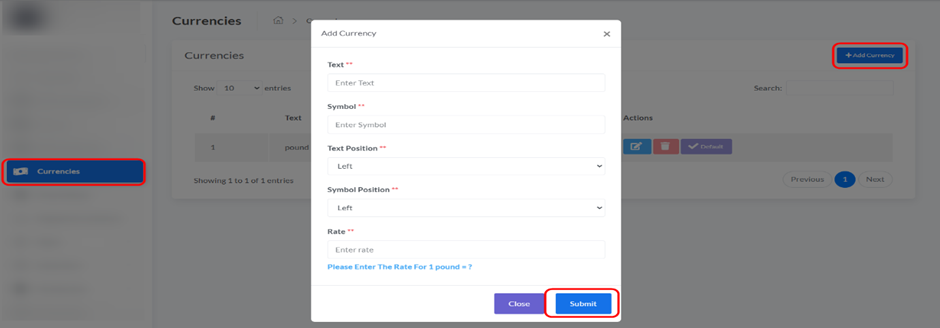
- A pop-up window will appear where you need to fill in the following details:
- Text: The name of the currency (e.g., “Japanese Yen”).
- Symbol: The symbol for the currency (e.g., “¥”).
- Text Position: Choose where the currency text appears (e.g., Left/Right).
- Symbol Position: Choose where the currency symbol appears (e.g., Left/Right).
- Rate: Enter the conversion rate for 1 USD.
For example, if 1 USD equals 0.96 Euro, you would enter 0.96 for Euro.
- Click “Submit” to add the new currency.
Updated on September 2, 2025



