
Overview: This sub-section allows you to manage the “Features” or “Benefits” displayed prominently on your homepage. These are typically short, distinct blocks of information, each with an icon, title, and subtitle, designed to highlight key aspects of your business, products, or services to visitors.
Access: From the main navigation menu on the left, click on “Pages”, select “Home Page” from the drop-down, and then click on the “Features” tab.
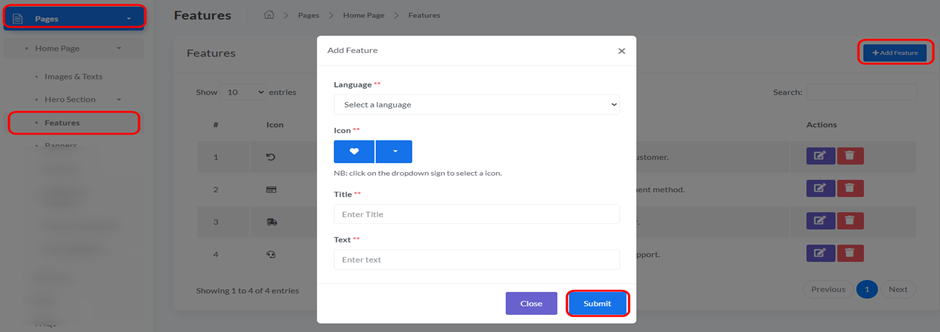
- To add a new feature block to your homepage, use the form at the top of this page. Fill in the following fields:
- Icon Class (Font Awesome Class): Enter the specific class name for the icon you wish to display with this feature. These icons are typically sourced from the Font Awesome library (e.g., fa fa-check, fa fa-shipping-fast). Ensure you use a valid class name for the icon to appear correctly.
- Title: Enter a concise and captivating main title for your new feature. This will be the primary heading displayed for the feature block.
- Text: Provide a supporting, descriptive line of text that offers more details or context about the feature.
- Language: (Crucial) Select the language for which this feature is intended. The feature will only be visible to users viewing your website in the language you select here. This ensures your homepage content is localized correctly.
- After filling in all details, click the “Add Feature” button to save your new feature configuration. It will then appear in the “Managing Existing Features” table below and, if the correct language is selected by the user, will be displayed on your homepage.


