
Access: To access the “+Add Blog Category” interface, navigate to “Pages” -> “Blog” -> “Category” -> “+Add Blog Category” in your dashboard.
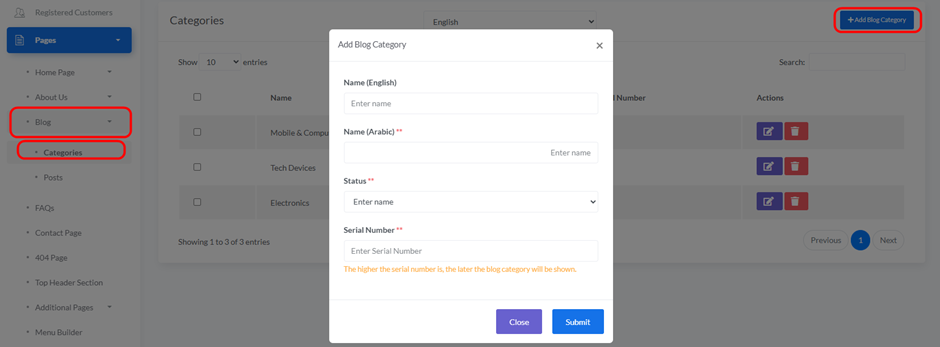
When you click the “+Add Blog Category” button, a pop-up window will appear for adding new category details:
- Language:
- Select the language in which the category will be displayed.
- Name (English):
- Enter the category name in English.
- Name (Arabic):
- Enter the category name in Arabic.
- Status:
- Choose the status of the category from the drop down (e.g., “Active”, “Inactive”).
- Serial Number:
- Enter a serial number to determine the display order of the category. The higher the serial number, the later the category will be shown.
- Close Button: Click “Close” to cancel adding the category.
- Submit Button: Click “Submit” to save the new category.


