
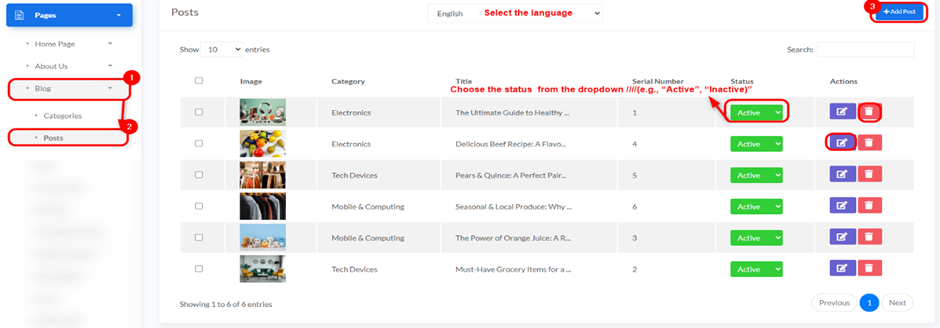
Overview: This section allows you to manage individual blog posts, including adding new posts, editing existing ones, and deleting them.
Access: To access the “Posts” settings, follow this path in your dashboard: “Pages” -> “Blog” -> “Posts”.
- Title:
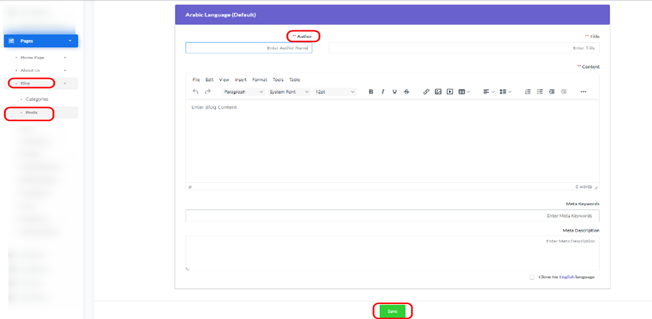
- Enter the title of the post in English.
- Author:
- Enter the name of the post’s author.
- Content:
- Enter the textual content for the post in English. A rich text editor is provided for content formatting.
- Meta Keywords:
- Enter keywords related to the post for search engine optimization.
- Meta Description:
- Enter a brief description of the post for search engine optimization.
- Arabic Language:
- Similar fields (Title, Author, Content, Meta Keywords, Meta Description) are provided for entering content in Arabic.
- Clone for Arabic language: You can click this option to copy the content from the English fields.
- Save Button:
- After filling in all required information, click the green “Save” button to save the new post.
- Back Button:
Click the “Back” button to return to the previous page without saving changes


