
Overview: This section allows you to update the footer logo, footer background image, footer text, useful links title, subscriber title, subscriber text, and copyright text.
Access: To access the “Update Footer Information” page, follow this path in your dashboard: “Pages” -> “Footer” -> “Footer Information”.
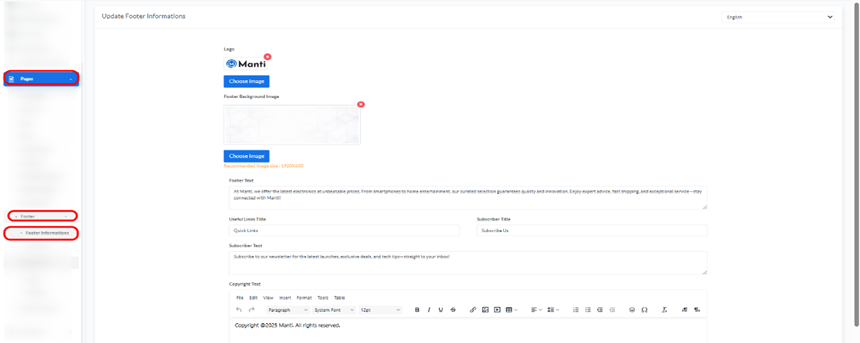
Updating Footer Information:

- Language: Use the drop down menu in the top right corner to select the language for which you want to update the footer information.
- Logo:
- Click the “Choose Image” button to upload the footer logo.
- Footer Background Image:
- Click the “Choose Image” button to upload a background image for the footer.
- Recommended image size: 1920×500.
- Footer Text:
- Enter the text that will appear in the footer.
- Useful Links Title:
- Enter a title for the useful links section (e.g., “Quick Links”).
- Subscriber Title:
- Enter a title for the subscriber section (e.g., “Subscribe Us”).
- Subscriber Text:
- Enter the text for newsletter subscriptions (e.g., “Subscribe to our newsletter for the latest launches, exclusive deals, and tech tips—straight to your inbox!”).
- Copyright Text:
- Enter the copyright text to be displayed in the footer (e.g., “Copyright ©2025 Buzz. All rights reserved.”).
- Update Button:
- After making the necessary changes, click the green “Update” button to save the information.


