
Overview: This section allows you to update the Search Engine Optimization (SEO) information for various pages on your website, which helps improve your site’s visibility in search engine results.
Access: To access the “Update SEO Informations” page, navigate to “Pages” -> “SEO Informations” in your dashboard.
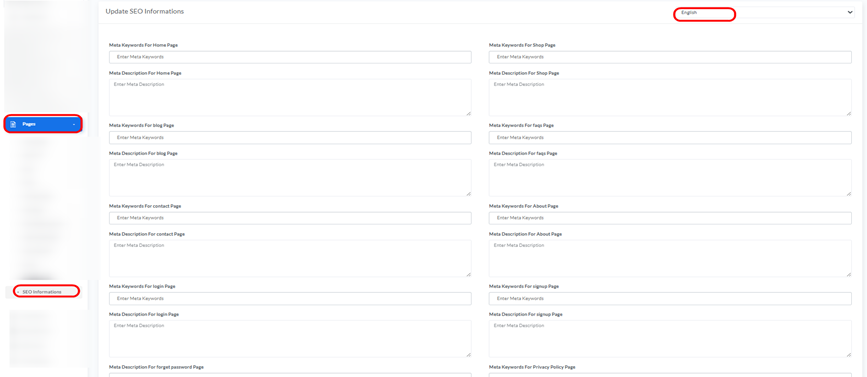
Updating SEO Information:
- Language: Use the drop down menu in the top right corner to select the language for which you want to update the SEO information.
- Meta Keywords: Enter relevant keywords for each page to help search engines understand its content.
- Meta Description: Enter a concise and appealing description of each page’s content, which often appears in search engine results.
- Editable Pages: You can update meta keywords and descriptions for the following pages:
- Home Page
- Shop Page
- Blog Page
- FAQ Page
- Contact Page
- About Page
- Login Page
- Signup Page
- Forgot Password Page
- Privacy Policy Page
- Update Button: After making the necessary adjustments, click the green “Update” button to save the changes
Subscribers
Overview: This section allows you to manage the list of subscribers for your website, which may include email addresses of users who have signed up for newsletters or updates.
Access: To access the “Subscribers” page, navigate to “Subscribers” -> “Subscribers” in your dashboard.
Managing Subscribers:
- Search by Email: Use the search field to find specific subscribers by their email address.
- Email: This column displays the email addresses of the subscribers.
- Action: For each subscriber in the list, you can:
- Delete: Click the red trash can icon to delete the subscriber from the list.


