
Overview: This section allows you to generate customized QR codes for specified URLs, with options to adjust color, size, and style.
Access: To access the “QR Code Generator” page, navigate to “QR Code” -> “QR Code Builder” in your dashboard.
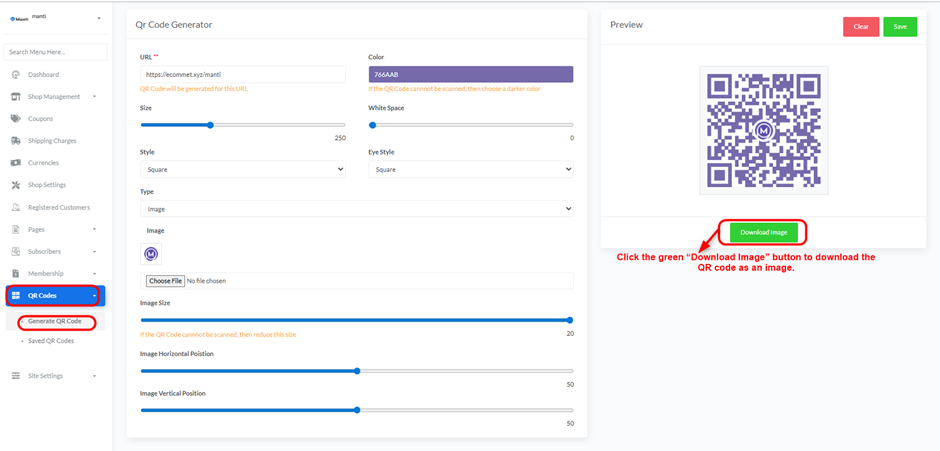
Generating a QR Code:
- URL: Enter the URL for which the QR code will be generated.
- Color: Select the color for the QR code. Note: If the QR code cannot be scanned, choose a darker color.
- Size: Use the slider to adjust the size of the QR code.
- White Space: Use the slider to adjust the amount of white space around the QR code.
- Style: Choose the style of the QR code (e.g., Square).
- Eye Style: Select the “eye” style of the QR code (e.g., Square).
- Type: Select the type of QR code (e.g., Default).
- Preview: A preview of the generated QR code will appear on the right side.
- Clear: Click the red “Clear” button to clear all fields.
- Save: Click the green “Save” button to save the QR code.
- Download Image: Click the green “Download Image” button to download the QR code as an image.


