
Maintenance Mode allows you to temporarily close your website to visitors and display a custom maintenance message, while you, as the site administrator, can still access it to perform updates, fixes, or any necessary maintenance work.
Accessing Maintenance Mode: From the “Site Settings” menu, select “Maintenance Mode”.
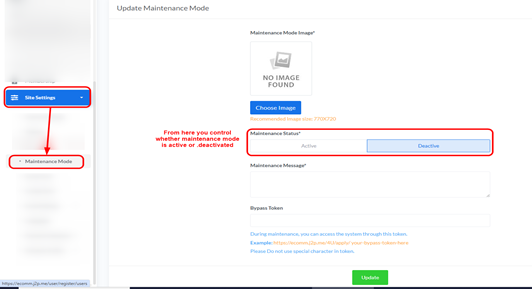
Update Maintenance Mode:
- Maintenance Mode Image:
- Description: This is the image that will be displayed to visitors when maintenance mode is active.
- How to Change: Click the “Choose Image” button to upload a new image.
- Note: The recommended image size is 770×720 pixels.
- Maintenance Status:
- Description: Controls whether maintenance mode is activated or deactivated.
- Options:
- Active: To activate maintenance mode. When active, regular visitors will not be able to access your site, and the maintenance page will be displayed.
- Deactive: To deactivate maintenance mode. When deactivated, your website will be available to visitors normally.
- Maintenance Message:
- Description: Enter the message you want to display to visitors on the maintenance mode page. You can use this to inform them about the reason for maintenance and the estimated time of return.
- Example: “Our website is currently under maintenance to improve your experience. We’ll be back soon!”
- Bypass Token:
- Description: This token allows you (and anyone with the token) to access the website normally even when maintenance mode is active. This is useful for developers or administrators who need to test the site during maintenance.
- How to Use:
- Enter any simple word or phrase (no special characters) in this field.
- A link will be provided showing you how to access your site using this token.
- Example: If your token is your-bypass-token, and your site’s URL is https://example.com/, you can access the site via https://example.com/bypass/your-bypass-token.
- Important Note: Do not use special characters in the token.
- Description: This token allows you (and anyone with the token) to access the website normally even when maintenance mode is active. This is useful for developers or administrators who need to test the site during maintenance.
Saving Changes: After making any adjustments to the maintenance mode settings, click the “Update” button at the bottom of the page to save and apply the changes.


