
This section allows you to manage and display a cookie alert notification on your website. This is essential for compliance with many privacy regulations (such as GDPR in Europe).
Accessing Cookie Alert: From the “Site Settings” menu, select “Cookie Alert”.
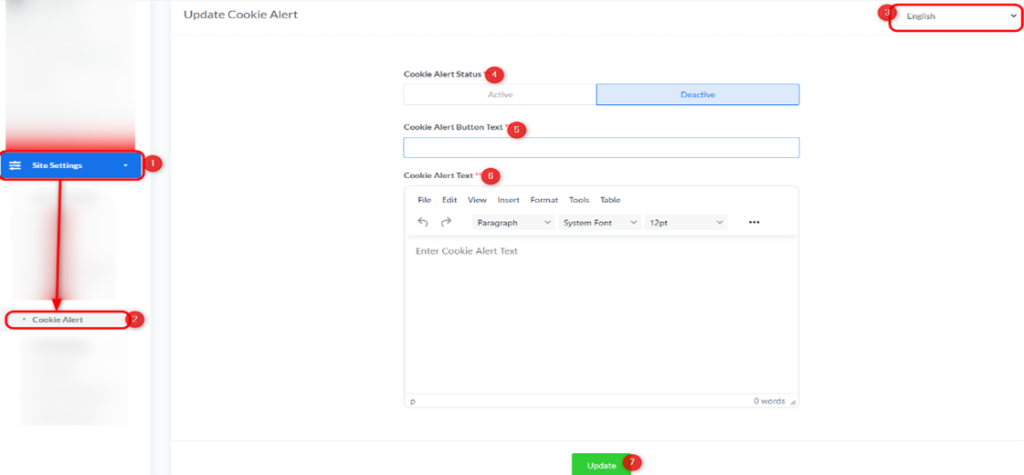
Update Cookie Alert:
- Alert Language:
- In the top right corner, you will find a dropdown menu to select the language in which the alert will appear. (In the image, “English” is selected).
- Cookie Alert Status:
- Description: Controls whether the cookie alert is displayed to visitors.
- Options:
- Active: To activate and display the cookie alert on your website.
- Deactive: To deactivate and hide the cookie alert.
- Cookie Alert Button Text:
- Description: The text that will appear on the button that visitors click to agree to cookie usage or close the alert.
- Example: “I Agree”, “Got it”, “Understood”.
- Cookie Alert Text:
- Description: The main content of your cookie alert message. Here you can explain to visitors that your site uses cookies, why, and perhaps direct them to your privacy policy for more details.
- How to Enter: Use the provided text editor to write your message. You can use basic formatting tools (e.g., bold, italic, links) to make the text clear and engaging.
- Example: “This website uses cookies to ensure you get the best Browse experience. By continuing to use our site, you agree to our use of cookies. To learn more, please read our [link to your privacy policy].”
Saving Changes: After making any adjustments to the cookie alert settings, click the “Update” button at the bottom of the page to save and apply the changes to your website.


