
Overview: This section allows you to add custom content sections to your “About Us” page, providing flexibility to display additional information beyond the default sections.
Access: To access the “Add Section” interface, navigate to “Pages” -> “About Us” -> “Additional Sections” -> “Add Section” in your dashboard.
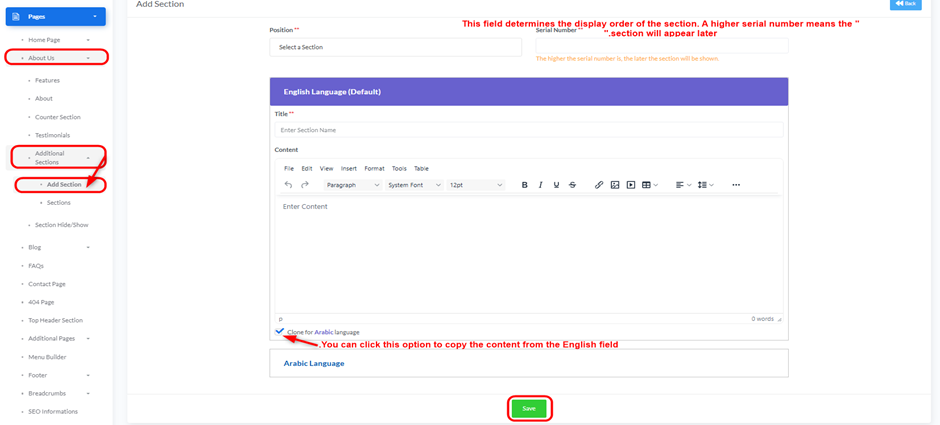
- Position:
- Use the drop-down to select the position of the new section on the “About Us” page.
- Serial Number:
- Enter a serial number to determine the display order of this section. The higher the serial number, the later the section will be shown.
- English Language (Default):
- Title:
- Enter the title for the section in English.
- Content:
- Enter the textual content for the section in English. A rich text editor is provided for content formatting (e.g., font, size, styling, tables).
- Title:
- Arabic Language:
- Title:
- Enter the title for the section in Arabic.
- Content:
- Enter the textual content for the section in Arabic. A rich text editor is provided for content formatting.
- Clone for Arabic language: You can click this option to copy the content from the English field.
- Title:
- Save Button:
- After filling in all required information, click the green “Save” button to save the new section.
- Back Button:
- Click the “Back” button to return to the previous page without saving changes.


