
This section allows you to link your own domain (e.g., yourwebsite.com) to your website, giving you a professional and independent identity.
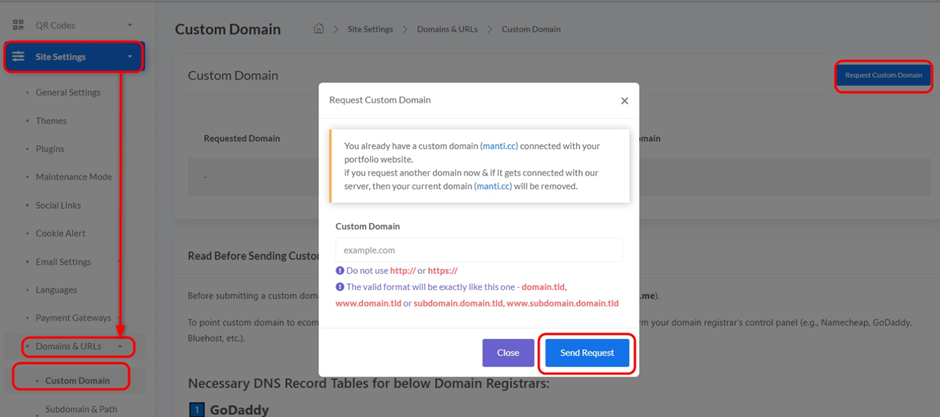
Access: From “Domains & URLs”, select “Custom Domain”.
Understanding the Custom Domain Linking Process:
- Read Before Sending Custom Domain Request:
- Important: Before you can request to link your custom domain, you must first point your domain’s DNS records to the current platform. This requires you to modify DNS settings with your domain registrar (e.g., GoDaddy, Namecheap, Bluehost, etc.).
- The platform’s main domain used in the examples is ecomm.j2p.me.
- Necessary DNS Record Tables:
- This section provides clear instructions on the DNS records you need to add or modify with your domain registrar. Examples are provided for common registrars (GoDaddy, Namecheap, Bluehost, Domain.com, HostGator, Google Domains, Hostinger), but the principle is the same for most registrars.
- Commonly Required Record Types:
- Type: A Record / CNAME Record
- A Record: Used to link the main domain (e.g., yourwebsite.com) to the server’s IP address.
- CNAME Record: Used to link subdomains (e.g., www.yourwebsite.com) to another domain.
- Host: Usually @ for the main domain, and www for the www subdomain.
- Value (Target):
- For A Record: This will be the IP address of YOUR_SERVER_IP (which should be provided to you by the platform).
- For CNAME Record: This will be the platform’s main domain (e.g., ecomm.j2p.me).
- TTL (Time To Live): Usually “Default” or “Automatic”, this determines how long DNS servers cache information before updating it.
- Type: A Record / CNAME Record
- Request Custom Domain:
- After modifying your domain’s DNS records and correctly pointing them to the platform, click the “Request Custom Domain” button in the top right corner.
- You will be prompted to enter your custom domain name to submit the request. The platform will then verify your DNS settings.
Important Note:
- It may take some time (from a few minutes to 48 hours) for DNS records to update and propagate across the internet.
- If you encounter difficulty setting up your domain’s DNS records, please contact your domain registrar’s support for assistance.


